
Meshy 7.1 Review: 80 Million Triangles and Ultra 4K Detail
AI 3D generators have become good at creating the basic shape of an object. The harder part is keeping the small details.
Engravings, fabric weaves, scales, stitches, carved lines, and surface patterns can make a major difference to a 3D model. Meshy 7.1 focuses directly on this problem with higher geometry resolution and a new Ultra 4K mode.
Released on September 10, 2026, Meshy 7.1 increases geometry generation from 2048³ to 4096³. Meshy says its raw meshes can contain up to 80 million triangles before simplification. It also introduced a Detail Richness benchmark to measure how much fine surface geometry its models retain. But before we have a look at it, let's have a look at the best alternative to Meshy.
SelfCAD AI: Best Alternative to Meshy 7.1
lthough Meshy AI excels at generating highly detailed 3D models, SelfCAD AI performs much better than Meshy AI when generating objects with moving parts and mechanical components. Examples include gear assemblies, hinged boxes, adjustable clamps, rotating mechanisms, and folding phone stands.
Another major advantage of SelfCAD is that it offers a complete 3D modeling environment beyond AI generation. Users can refine their AI-generated models using tools such as Boolean Operations, 3D Sculpting, Deform Tools, Shape Generators, Stitch & Scoop, and Magic Fix for repairing mesh issues. SelfCAD also includes an online slicer, which allows users to prepare models for 3D printing and generate G-code directly within the platform. This means users can generate, edit, refine, repair, and prepare their models for 3D printing without constantly switching between different applications. While Meshy AI is particularly useful for creating highly detailed visual assets, SelfCAD provides a more comprehensive solution for practical 3D modeling and 3D printing.
4096³ Ultra 4K Geometry for Fine Surface Details
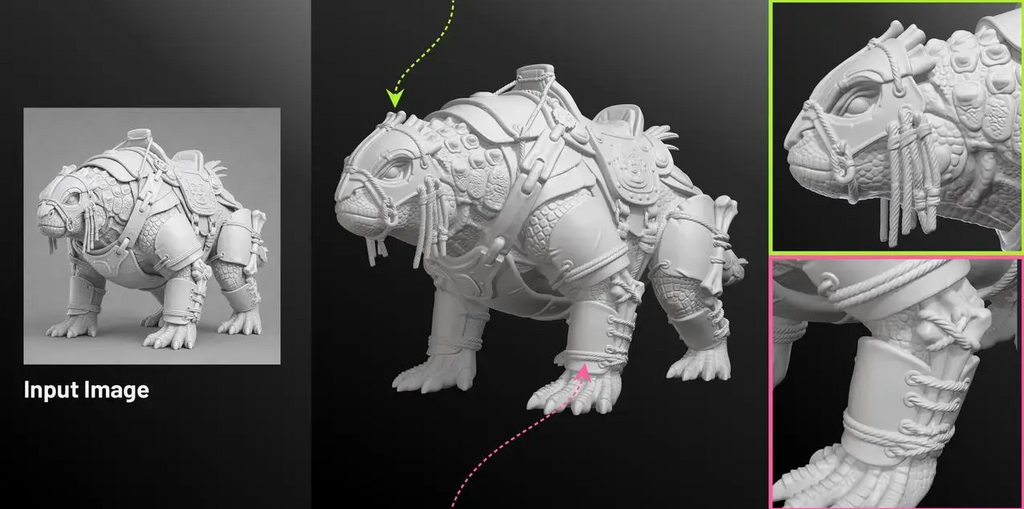
The biggest upgrade in Meshy 7.1 is its Ultra 4K geometry mode. It increases the geometry generation resolution from 2048³ in Meshy 7 to 4096³.
This gives the model a much larger space in which to represent small geometric structures. Meshy designed this specifically for details such as armor engravings, fabric patterns, scales, stitches, ridges, and carved surfaces.
According to Meshy, 4096³ was the highest geometry resolution reached by a 3D generative model at the time of the 7.1 release. A raw mesh can contain up to 80 million triangles before simplification.
That does not mean every model needs 80 million triangles. It means Meshy 7.1 has much more geometric information available when creating highly detailed objects.
Real Geometric Detail Instead of Just Texture
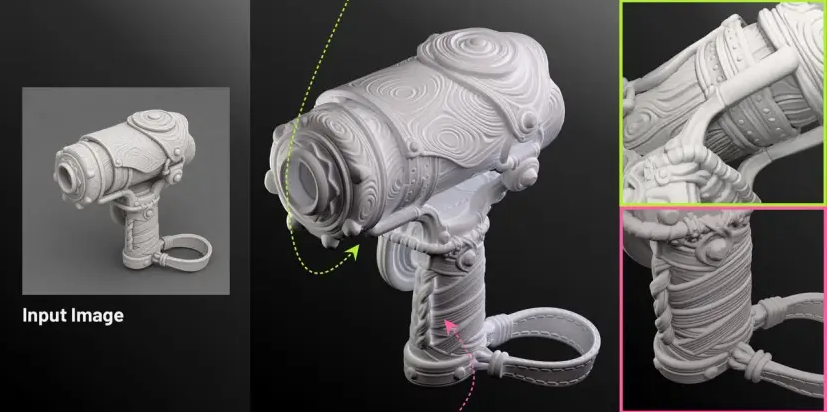
One of the most useful parts of Meshy 7.1 is that its fine details are built into the geometry. This matters because a texture can make a surface look detailed without actually changing its shape. A printed object, however, needs physical geometry for details such as grooves, raised patterns, and engravings to appear in the final model.
Meshy says the details shown in its Ultra 4K examples are real geometry. Its benchmark images were also designed with rich structural detail and simple textures so the test could focus on whether the AI recreated those details as geometry.
For 3D printing, this can be more useful than simply generating a highly textured model. Physical surface changes can affect shadows, silhouettes, and the actual printed surface.
Up to 80 Million Triangles Before Simplification
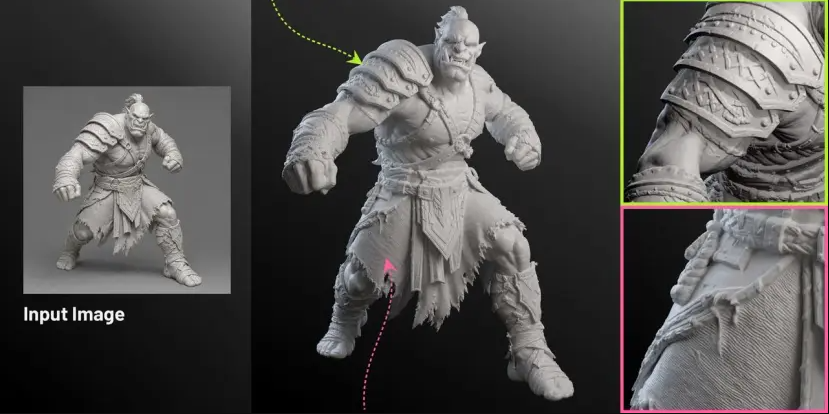
Meshy 7.1 can produce extremely dense raw meshes. Meshy reports that a model generated directly from the system can reach up to 80 million triangles before simplification. This high polygon count is useful for retaining small surface structures during the generation stage. However, it does not mean that an 80-million-triangle model is automatically better for every project.
A dense mesh can be difficult to edit, export, process, or prepare for 3D printing. Most users will need to simplify the model depending on where it will be used.
For a game asset or simple object, Standard or Ultra 2K may be enough. Ultra 4K makes more sense when the model will be viewed close up or when small geometric details are important.
Detail Richness Benchmark for Measuring Surface Geometry
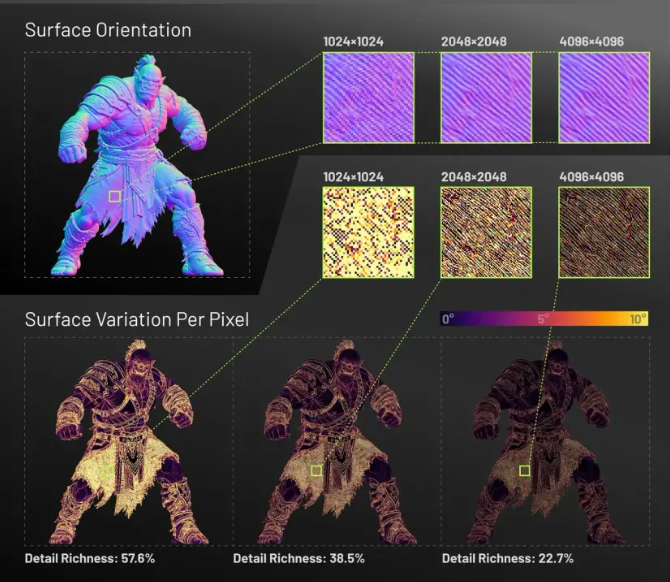
Meshy 7.1 also introduces the Detail Richness benchmark. The benchmark measures how much of a model's visible surface contains significant geometric variation at different render resolutions. Meshy renders models from multiple viewing directions and measures the surface variation that needs to be resolved at the selected resolution.
This gives Meshy a way to compare geometric detail between different AI 3D models instead of relying only on visual screenshots.
The benchmark is particularly useful because fine detail can be difficult to judge objectively. Two models may look similar from a distance, while one contains much more actual geometry when viewed closely.
Meshy 7.1 Leads Its Internal Detail Benchmark
|
|
|
|
|
|
|
|
|
|
|
|
|
|
|
|
|
|
|
|
|
|
|
|
|
|
|
|
At 1024 resolution, Meshy 7.1 scored 53.5%, compared with 51.4% for Rodin 2.5. At 2048, it scored 37.4%, while Rodin reached 35.0%. At 4096, Meshy scored 23.1%, narrowly ahead of Hi3D 3.0 at 21.9%.
These results are Meshy's own internal benchmark, so they should not be treated as an independent industry test. Still, they show where Meshy 7.1 is positioning the model: fine geometric detail rather than simply better textures or larger output files.
More Detail Without Adding Random Surface Noise
More polygons can sometimes create more noise instead of better detail. Meshy specifically tested this problem with Meshy 7.1.
Its comparisons between Standard, Ultra 2K, and Ultra 4K showed stronger details such as fabric weaves and surface structures without a significant increase in unwanted noise on flat areas.
This is important for practical modeling. A high-resolution AI model is only useful if the extra geometry represents meaningful structure.
For example, a carved pattern should appear as an organized ridge or groove. Random bumps across an otherwise flat surface are less useful and can make a model harder to edit or print.
Standard, Ultra 2K, and Ultra 4K Options
Meshy 7.1 provides different geometry-resolution options so users do not have to use the highest setting for every model.
Standard is suitable when the model does not need extremely fine geometry. It can reduce the amount of geometry that needs to be processed.
Ultra 2K provides more surface detail and is available for both single-view and multi-view generation.
Ultra 4K provides the highest geometry resolution at 4096³ and is designed for the most detailed results. Meshy currently limits Ultra 4K to single-view generation, while Ultra 2K supports both single-view and multi-view workflows.
The best setting therefore depends on the model. Using Ultra 4K for a simple background object may provide little practical benefit, while a detailed collectible, sculpt, or hero asset can benefit much more.
Meshy 7.1 Supports Image-to-3D and Text-to-3D
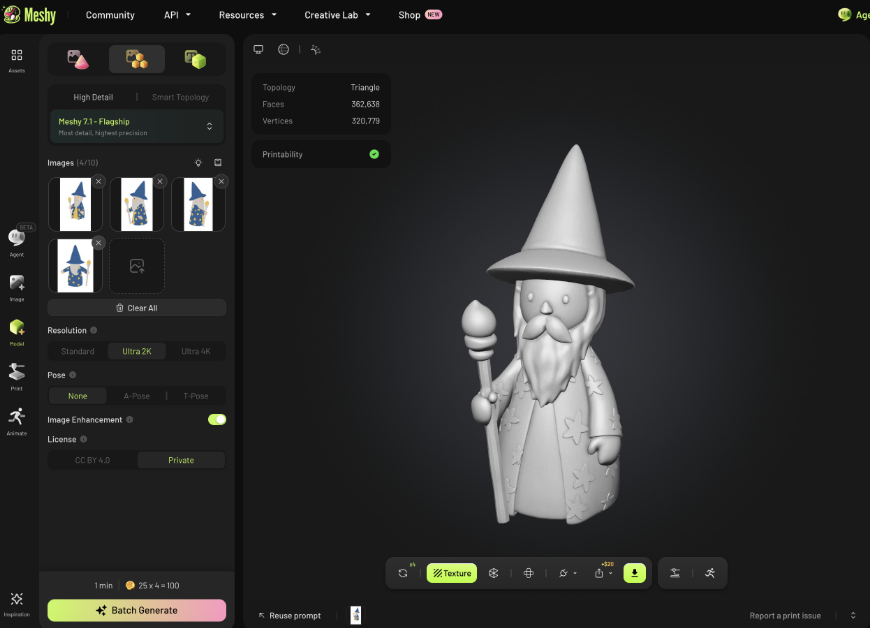
Meshy 7.1 is not limited to one generation workflow. The model is available across Meshy's Image to 3D, Multi-Image to 3D, and Text to 3D APIs.
Meshy's API documentation lists meshy-7.1 as the current model and adds standard, 2k, and 4k geometry-resolution settings. The 4K option requires Meshy 7.1 and is currently unavailable for Multi-Image to 3D through the API.
This makes the model useful for different types of AI-assisted 3D creation. You can start with a single reference image, generate from text, or use multiple images when the workflow supports it.
Ultra 4K Is Better for Detail-Heavy Models
When there are many tiny structures in the model, Meshy 7.1's best feature becomes apparent. Envision a fantastical figure whose armor is adorned with intricate carvings, an animal with scales, a structural element with intricate carvings, or an item with surface grooves and stitches.
Compared to a smooth cube or vase, these forms might benefit more from more geometric detail. Images created by Meshy demonstrate how finer geometric resolution brings out details such as weaves, ridges, stitches, and scales. Additionally, this can be useful if you like to create a tangible item with discernible surface relief during the 3D printing process, as opposed to merely utilizing color or texture.
Is Meshy 7.1 Free?
Meshy 7.1 is available to registered Meshy users, but there are restrictions around the higher geometry settings. Meshy says registered users can access Meshy 7.1, while Ultra 2K, Ultra 4K, and downloading Meshy 7.1-generated models require a subscription. Ultra 4K is also currently limited to single-view generation.
Prepare Meshy 7.1 Models for 3D Printing With SelfCAD
Meshy 7.1 is useful for generating detailed geometry, but an AI-generated mesh may still need cleanup before printing. SelfCAD can work well as the next stage of the workflow.
Its Magic Fix tool can repair common mesh problems such as holes, non-manifold edges, inverted normals, and overlapping geometry. Geom Clean removes duplicate or overlapping vertices, edges, and faces. You can then use Boolean, Simplify Object, Fillet, Chamfer, and other modeling tools to modify the generated model before printing.
This makes SelfCAD a useful 3D design and preparation tool when you want to take a highly detailed AI-generated model and turn it into a cleaner, more practical printable object.
Final Verdict
Geometric detail is the major focus of Meshy 7.1. The new Detail Richness benchmark, actual geometric surface detail, raw models with up to 80 million triangles, and 4096³ Ultra 4K geometry resolution are its strongest specifications. In terms of internal testing, Meshy outperformed the competing models across all three render resolutions (1K, 2K, and 4K).
It is possible that Ultra 4K is not required for basic models. A higher resolution can be evident for 3D-printed creations with surface geometry that matters, such as intricate characters, collectibles, sculptures, props, and so on.
More polygons aren't necessarily better. Having more relevant geometry where the model truly needs it is the useful portion.