
Bambu Lab RFID Filament: How It Works?
Bambu Lab RFID filament is designed to make filament management easier, especially when used with a Bambu Lab AMS. Instead of manually identifying every spool, the AMS can read the RFID tag attached to compatible Bambu filament and automatically recognize important information about it.
But how does Bambu Lab RFID filament work, what information does the tag contain, and do you actually need RFID filament to use an AMS?
What Is Bambu Lab RFID Filament?
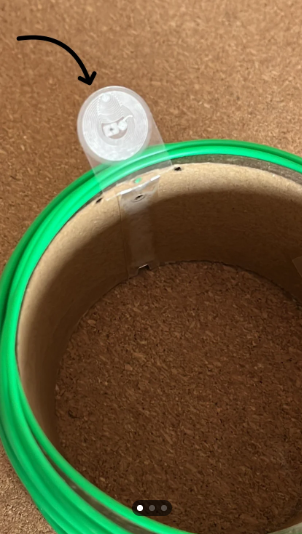
Radio Frequency Identification is what RFID stands for. Spools and refills of suitable filament are RFID-tagged by Bambu Lab. After inserting the spool into an AMS, the technology can detect the filament by reading the tag.
Rather than being necessary for using filament, Bambu Lab added RFID mostly as a convenience feature. The AMS is compatible with the majority of filaments, according to the company's own explanation. If your filament doesn't have an RFID chip, you can still use Bambu Studio or the printer's interface to manually set the material and color.
It is critical to note this difference. RFID automates filament maintenance but does not confer proprietary status on the filament itself.
How Does Bambu Lab RFID Work?
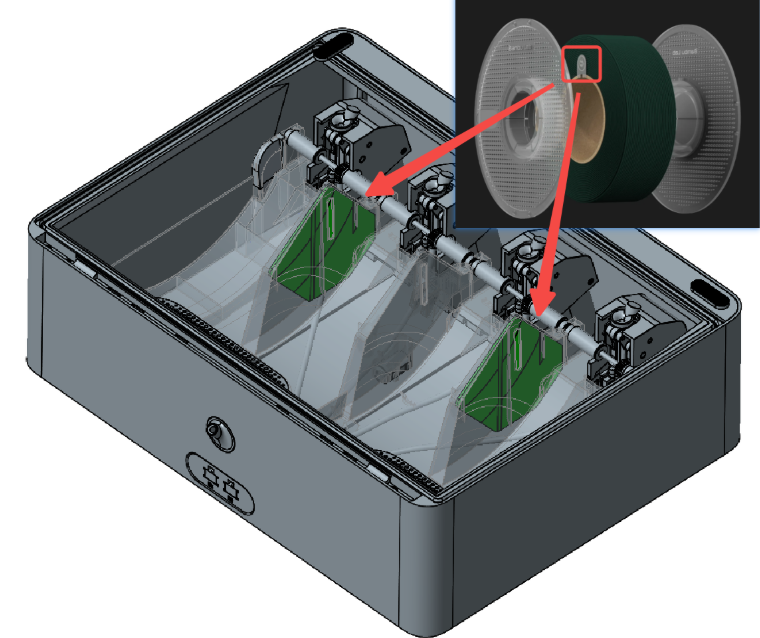
From the user's point of view, the process is relatively straightforward. The AMS can read the tag on an RFID spool from Bambu Lab when you insert it into an appropriate slot. After that, details like the spool's color and filament type are associated with it in the system.
The tag contains more specific information than just "Bambu filament." Filament type, color information, diameter, temperature, production data, and detailed filament type are some of the fields identified in independent documentation of Bambu Lab's RFID format.
The most crucial aspect is that loading a tagged spool does not require you to manually input the basic filament identifier.
The basic workflow
Load spool → AMS reads RFID → filament is identified → Bambu Studio/firmware associates the filament profile → printer is ready to use it.
This becomes particularly useful when several different materials and colors are loaded into an AMS.
What Information Does the RFID Tag Provide?
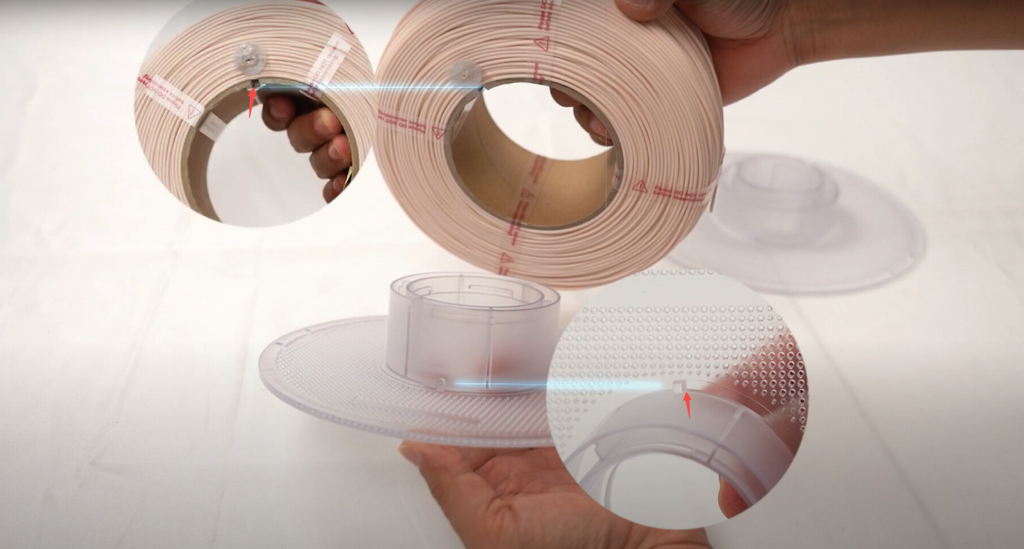
The particular filament can be located with the use of the data stored by the RFID technology. Filament type and more specific material details are examples of known RFID data. Color codes, spool-related data, temperature/drying info, production details, filament length, and tag format documentation additionally define filament diameter. Be careful not to conflate RFID data with the full printer profile, though.
Identifying the filament is the primary function of the RFID tag. The printer ecosystem and Bambu Studio thereafter utilize the identified material details to associate or choose the suitable filament profile and settings. This is why, in contrast to loading a typical third-party PLA spool, loading a Bambu PLA spool can feel practically natural.
How Does the AMS Know How Much Filament Is Left?
Among the many intriguing aspects of the system, this one stands out. Using an RFID tag to measure the spool's weight is just the beginning. The alternative is Bambu's AMS, which estimates filament remaining by reading RFID tags and tracking filament movement through the machine.
According to Bambu's datasheet, the procedure involves determining the remaining % by seeing the amount of filament sent out during the whole rotation of the RFID marker. By default, a new 1 kg roll is considered to be 100% capacity.
Along the filament path, the AMS also has an odometer. According to Bambu, their AMS keeps tabs on the filament's position, speed, and tension using a number of sensors, including an odometer. In simple terms:
RFID identifies the spool + AMS measures filament movement + spool rotation provides an estimate of remaining material.
This is why the remaining-filament display should be treated as an estimate, not a precision weighing system.
5 Best Bambu Lab RFID Filaments
1. Bambu Lab PLA Basic — Easy Printing and Up to 258 mm/s Speed
Bambu Lab PLA Basic is one of the easiest RFID filaments to recommend for everyday 3D printing. It is designed for beginners and general-purpose models, offering a smooth surface finish, reliable printing, and good layer adhesion. Bambu Lab lists a diameter of 1.75 mm ± 0.03 mm, compatibility with AMS and AMS lite, and a maximum print speed of up to 258 mm/s under its specified test conditions using a 0.4 mm nozzle, 0.4 mm line width, and 0.2 mm layer height. The RFID tag stores the printing parameters, so a compatible AMS can recognize the filament automatically. It is a good choice for prototypes, decorative models, toys, organizers, and everyday prints where easy handling matters more than high-temperature resistance.
Price: $15.99
2. Bambu Lab PLA Matte — Matte Finish and Up to 270 mm/s Speed
The non-glossy surface of Bambu Lab PLA Matte, in conjunction with PLA's easy printing capabilities, helps to make layer lines less obvious. Models where form follows function, such as decorative items, architectural models, showpieces, and art prints, are its intended targets. Under the test parameters specified by Bambu Lab, the filament can achieve speeds of up to 270 mm/s, has a diameter of 1.75 mm ± 0.03 mm, and is compatible with AMS and AMS light. Its RFID tag saves printing settings for AMS automatic recognition, cutting down on setup time. To ensure consistent print quality, Bambu Lab suggests drying PLA Matte before using it. Their recommended drying procedure is 50°C for 8 hours in a blast drying oven.
Price: $15.99
3. Bambu Lab PETG HF — High-Speed PETG Up to 2× Faster Than Standard PETG
Bambu Lab PETG HF is designed for users who want the toughness and durability of PETG without giving up the faster workflow associated with modern high-speed printers. Bambu Lab says PETG HF can print at up to twice the speed of standard PETG, depending on the model and geometry, while its formulation is designed to reduce common PETG issues such as oozing and clumping. It has a 1.75 mm ± 0.03 mm diameter, works with AMS and AMS lite, and provides greater toughness and heat resistance than PLA. Bambu Lab lists a 69°C HDT at 0.45 MPa and describes the material as suitable for longer-lasting parts and outdoor applications. The RFID tag contains the printing parameters and can be read automatically by the AMS. PETG HF should be dried before printing for optimal results.
Price: 15.99
4. Bambu Lab ABS — 87°C Heat Deflection and Strong Functional Parts
Bambu Lab ABS is a better option when a printed part needs more heat resistance, toughness, and durability than standard PLA can provide. It has a heat deflection temperature of 87°C, a bending strength of 62 ± 4 MPa, and an impact strength of 39 ± 3.6 kJ/m², according to Bambu Lab's published specifications. The filament has a 1.75 mm ± 0.03 mm diameter, supports the AMS, and is designed for enclosed printers rather than the AMS lite. Bambu Lab recommends a 240–270°C nozzle temperature, 80–100°C bed temperature with glue, and drying at 80°C for 8 hours under its listed conditions. The RFID tag contains the printing parameters, allowing a compatible AMS to recognize the filament automatically. ABS is well suited to functional components, prototypes, housings, and parts that may experience moderate heat or repeated impacts.
Price: 15.99
5. Bambu Lab ASA — UV Resistance and 100°C Heat Resistance for Outdoor Prints
Bambu Lab ASA is the strongest choice on this list when the printed part needs to survive prolonged outdoor exposure. Its main advantage over ABS is its improved resistance to UV radiation, weathering, oxidation, and aging, while maintaining good toughness and temperature resistance. Bambu Lab lists a 100°C heat-deflection temperature, 65 MPa bending strength, and 41.0 kJ/m² XY impact strength. It uses 1.75 mm ± 0.03 mm filament, is compatible with the AMS but not AMS lite, and requires an enclosed printer. Recommended settings include a 240–270°C nozzle, 80–100°C bed temperature with glue, and a print speed below 250 mm/s. Like the other Bambu Lab RFID options, its printing parameters are embedded in the RFID tag and can be read by the AMS. ASA is particularly suitable for outdoor signs, plant markers, mailboxes, wind vanes, functional brackets, and other parts exposed to sunlight and changing weather.
Price: $29.99
Best 3D Modeling Software
SelfCAD is a strong choice if you want to design and customize your own 3D-printable models before using Bambu Lab RFID filaments. Its tools, including Fillet, Bevel, Chamfer, Resolution, Simplify Object, Scale, and AI Assistant, make it easier to create, refine, and prepare models for printing. You can then export your finished design as an STL and slice it for your Bambu Lab printer.
Final Verdict
Bambu Lab RFID filament is best understood as an automatic filament identification and management feature rather than a proprietary printing requirement.
The RFID tag stores information about the spool, while the AMS combines that information with its sensors and filament movement data to help identify the material and estimate remaining filament.
Its strongest benefits are simple:
- Automatic filament identification
- Automatic color recognition
- Easier AMS management
- Simpler multicolor printing
- Less manual profile selection
- Filament usage estimation
But the most important takeaway is this: you do not need RFID filament to use a Bambu Lab AMS.
RFID makes the workflow faster and more automated. It does not determine whether a filament can be printed. With compatible third-party filament, you can still use the AMS; you just take over the identification and profile-selection steps manually.