
7 Ways AI Can Reduce 3D Modeling Iteration Time
3D modeling is rarely a one-and-done process. A designer creates a model, checks it, changes the geometry, tests it again, and repeats the process until the result works.
AI can shorten this loop by handling some of the repetitive work and generating more options earlier. Modern tools can create 3D concepts from text or images, suggest design changes, optimize geometry, and identify problems before a physical prototype is made.
Here are 7 practical ways AI can reduce 3D modeling iteration time, with real tools and examples for each.
1. Generate 3D Concepts From Text or Images
Creating a preliminary model from a concept can be a time-consuming part of the early design process. AI-powered 3D generators simplify this process by turning text descriptions, drawings, or reference images into 3D models, giving designers a starting point without having to build everything from scratch.
A good example is SelfCAD, which offers AI-powered text-to-3D. Users can describe an object in words or upload a reference image to generate a 3D model.
This makes it easier to explore different concepts, visualize ideas, and create initial prototypes without spending hours manually constructing the geometry. Once generated, the models can be further refined using SelfCAD's built-in modeling tools, including Boolean Operations, Sculpting, and Deform Tools.
Real-World Example: A product designer can upload a sketch of a phone stand or describe a storage organizer using a text prompt and generate an initial 3D model with SelfCAD AI. They can then modify its dimensions, adjust its geometry, and refine the design using SelfCAD's modeling tools before preparing it for 3D printing.
How it helps designers save time: SelfCAD AI reduces the time spent creating initial models from scratch, allowing designers to move directly to refining concepts, exploring design variations, and developing prototypes.
2. Explore More Design Variations
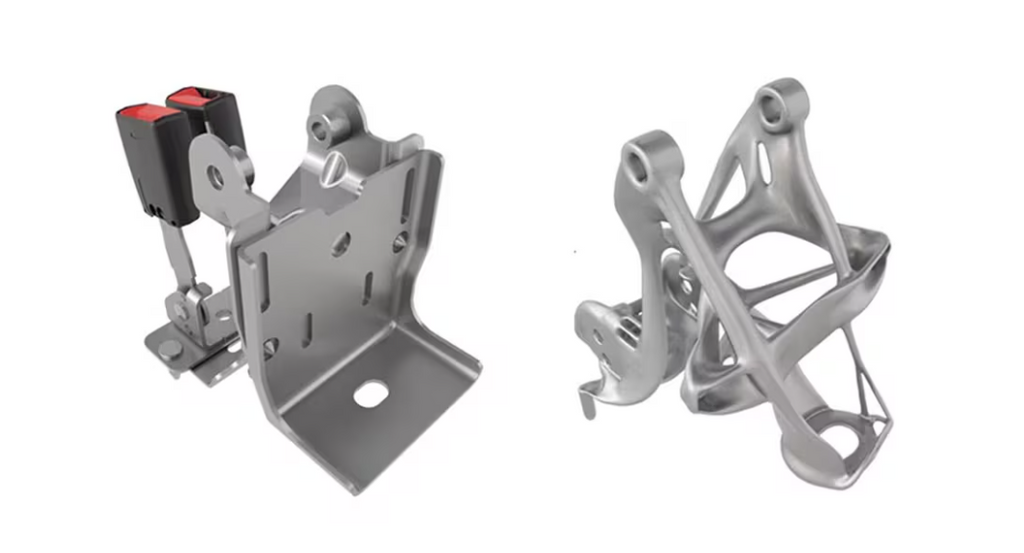
The standard practice in traditional modeling is to make changes to one design, test it, and then make yet another version. With the same set of parameters, AI generative design can investigate a wide variety of possible solutions.
Designers can specify needs, limitations, materials, and production processes with Autodesk Fusion Generative Design, and then the program will generate various possible designs. Autodesk boasts that their present generative methodology may cut down on revision iterations from days or weeks to hours.
Real-world example: The combination of additive manufacturing and Autodesk generative design by General Motors to create a lighter seat bracket is a famous example. This design integrated eight different parts into a single 3D-printed object.
How it saves time: AI can explore many possible geometries in parallel instead of making the designer build and test each variation manually.
3. Optimize Geometry for Weight and Strength
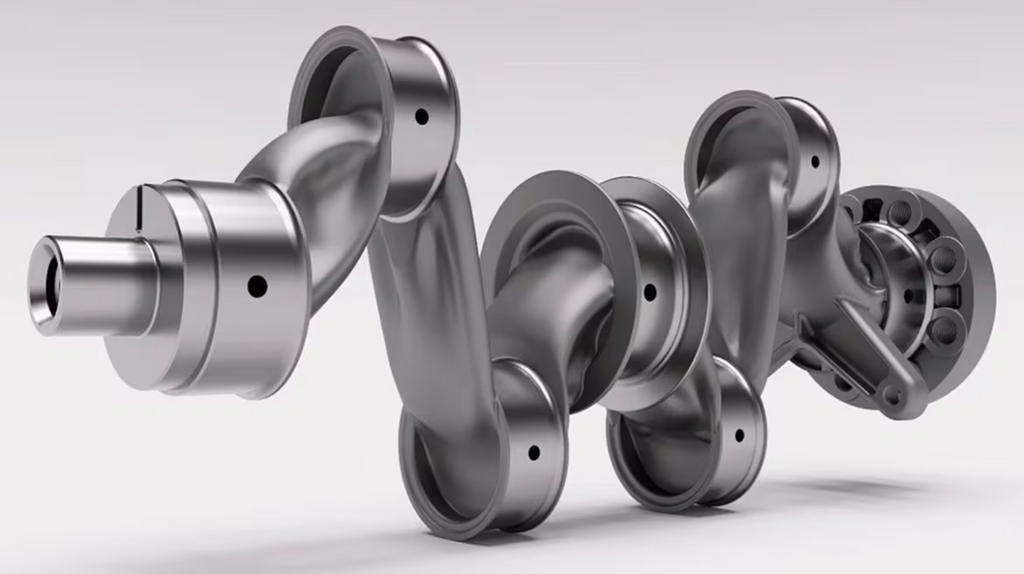
AI can help designers find a better balance between weight, strength, material use, and performance.
This is particularly useful for parts intended for 3D printing because additive manufacturing allows complex shapes that would be difficult to produce with traditional manufacturing.
Autodesk Fusion's generative design evaluates design alternatives against mechanical and manufacturing requirements. NVIDIA also describes generative AI workflows that can explore large numbers of manufacturing design concepts and evaluate different performance factors.
Real-world example: A real example is Honda R&D, which used Autodesk Fusion's generative design to develop a new crankshaft. The resulting design achieved a 50% weight reduction compared with a conventional crankshaft design. Honda also tested the prototype on an engine to evaluate its performance.
How it saves time: Designers don't have to manually create dozens of lightweight versions and then determine which ones meet the required constraints.
4. Catch Design Problems Earlier
A major source of iteration is discovering a problem late in the process. A part may look correct but fail a manufacturing or design check. AI-assisted CAD can identify some of these issues earlier.
Siemens NX Molded Part Designer, for example, uses AI techniques to help with moldability validation. Siemens says its machine-learning system can predict draft angles, perform validation checks, and suggest corrections when a design does not meet requirements.
This is especially useful for injection-molded parts, where correcting a design after sending it for manufacturing can create additional revisions.
How it saves time: Problems are flagged while the model is still being designed instead of after it reaches another engineer, supplier, or manufacturer.
5. Automate Repetitive Modeling Tasks
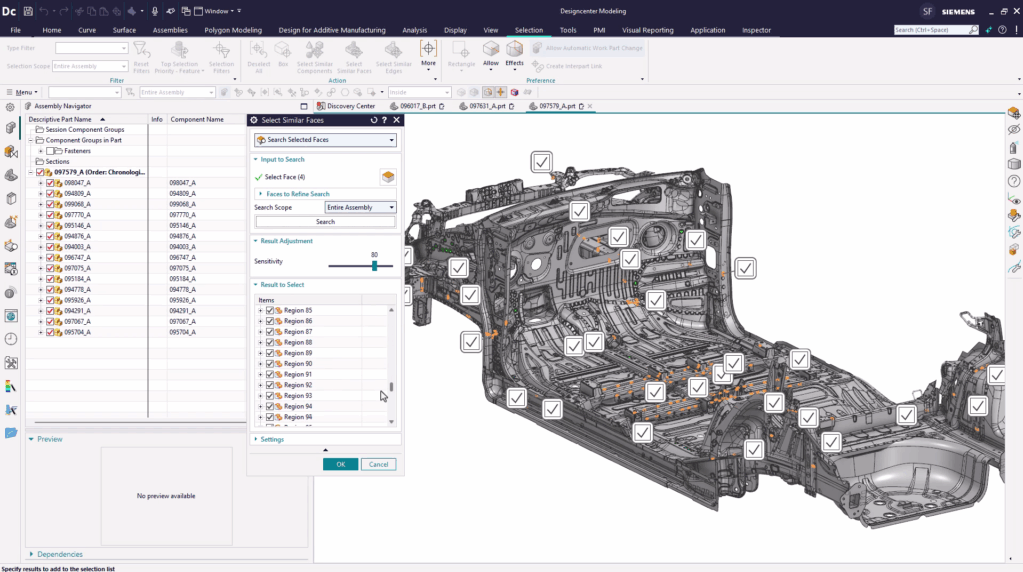
Not every iteration requires creative thinking. Designers often repeat actions such as selecting similar faces, modifying features, preparing models, or making standard changes. AI can automate some of these operations.
Siemens NX includes AI-enabled capabilities such as Select Similar Faces, while its AI-enabled CAD tools can assist with repetitive operations and contextual design tasks. Siemens also reports that its AI-enabled workflows are intended to reduce redundant tasks and design friction.
How it saves time: Instead of manually finding and changing every matching feature, AI can identify similar geometry and help apply changes across the model.
This becomes particularly valuable on complex models with hundreds or thousands of faces and features.
6. Clean and Optimize AI-Generated or Scanned Models
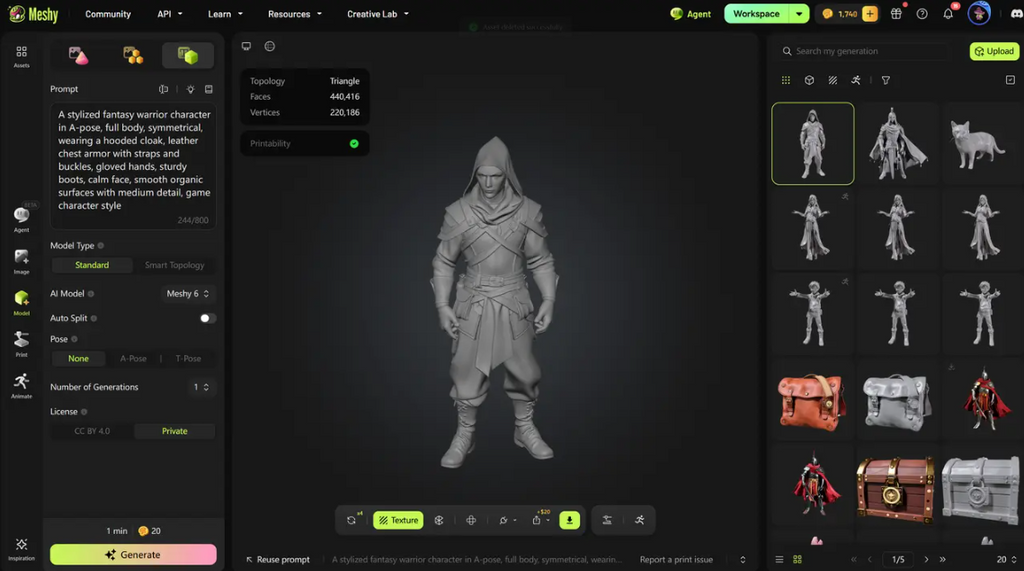
AI can also reduce iteration time after the initial model has been created. AI-generated and scanned models can contain dense or irregular geometry. Cleaning that topology manually can take considerable time before the model is ready for animation, further editing, or 3D printing.
Meshy's AI Retopology automatically rebuilds dense meshes into cleaner quad or triangle topology. Users can select target polygon counts, and the tool can export formats including STL and 3MF for 3D-printing workflows. Meshy estimates the remeshing process at about a minute per model.
How it saves time: A designer can automatically clean up the mesh instead of manually rebuilding its topology polygon by polygon.
7. Reduce the Number of Physical Prototypes
Physical prototyping creates another iteration loop:
Design → print → test → modify → print again
AI-assisted simulation and optimization can move some of that testing into the digital stage.
For example, Ansys provides simulation tools that can be used to evaluate designs before manufacturing. In a case study involving 3D Printing Corporation, Ansys simulations helped analyze part performance and identify potential defects. The company reported reducing part weight while using simulation insights to improve production.
Similarly, Siemens' NX Performance Predictor brings simulation into the CAD environment and uses AI-enhanced search for design-space exploration, helping designers identify performance issues earlier in the design process.
How it saves time: Designers can test more ideas digitally before committing time and material to physical prototypes.
A Real Example of AI Cutting 3D Modeling Time
The impact can be significant when AI is integrated into the workflow rather than used for just one task.
Jupiter, a company working on glasses-free 3D display technology, used Meshy's AI-powered workflow for 3D content production. According to its published case study, Jupiter reduced basic model production from 7 days to 2 hours, a claimed 98% reduction in production time. Complex models were reported to be produced in less than one-third of the previous time, while initial client-rendering cycles dropped from 48 hours to 4 hours.
This illustrates an important point: AI does not have to replace the designer to reduce iteration time. It can shorten several small steps across the workflow.
Where AI Has the Biggest Impact
|
|
|
|
|
|
|
|
|
|
|
|
|
|
|
|
|
|
|
|
|
|
|
|
|
|
|
|
|
|
|
|
AI Does Not Remove the Need for Designers
AI can shorten the modeling loop, but it does not make every generated model production-ready.
AI-generated geometry may still need dimensional corrections, topology cleanup, engineering validation, and manual modeling. Designers and engineers also need to check whether the result actually meets the project's functional and manufacturing requirements.
Autodesk itself describes generative design as a process where the designer defines the constraints and evaluates the resulting options rather than simply accepting whatever the AI generates.
Conclusion
By automating tedious, repetitive tasks, AI can shorten the iteration time required for 3D modeling. Starting models, many design possibilities, optimized geometry, problem detection, automated repeating adjustments, clean meshes, and reduced requirement for physical prototypes are all within its capabilities.
Improving the speed of a single model is not the primary advantage. As a result, designers can put more ideas to the test with less effort. That can imply fewer manual steps and unnecessary revisions for 3D printing, which means going from an initial concept to a tested physical prototype more quickly.