
10 Expensive Woodworking Accessories You Can 3D Print
Woodworking accessories can get expensive quickly. A precision router jig, drilling guide, corner clamp, featherboard, or specialty cutting guide may cost considerably more than the filament required to print a functional alternative. That makes 3D printing particularly useful in a woodworking shop. You can produce custom jigs for the tools you already own, modify dimensions for a particular project, and print several copies when a job requires them.
1. Ultimate Router Jig
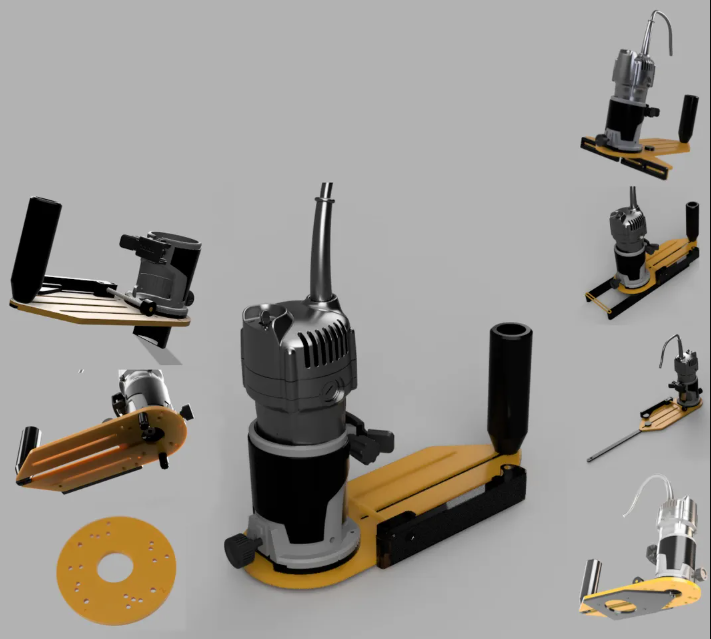
For woodworkers who frequently make mortises, tenons, and shelf-pin holes, Garage Maker's Ultimate Router Jig is a highly handy printable router accessory. This design integrates many functionalities into a single jig, eliminating the need to purchase separate guides for various routing jobs. For tasks requiring consistent placement, such as those in furniture construction, cabinetry, joinery, and other workshop pursuits, this tool is invaluable. By positioning the workpiece against a consistent reference, a router jig can also significantly save setup time. Makers will love this design since it allows them to print a specialized jig instead of buying additional commercial equipment for specialty routing operations.
Why print it?
- Multiple routing applications
- Repeatable positioning
- Useful for cabinets and furniture
- Reduces setup time
- Customizable workshop solution
Platform: Printables
2. Corner Radius Jig for Router
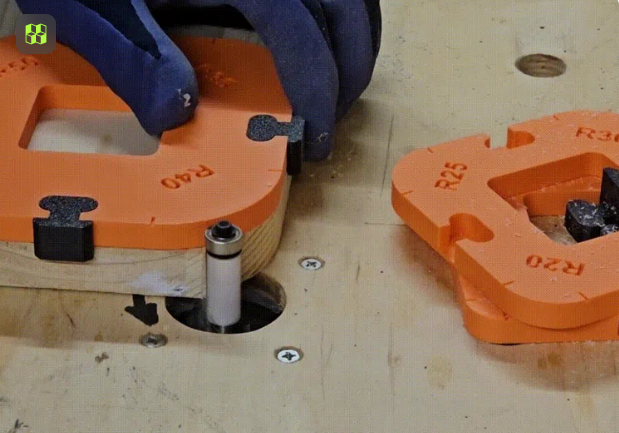
A corner-radius router jig is useful when you need consistent rounded corners across multiple workpieces. The MakerWorld design by pomguy is especially practical for woodworkers who frequently make furniture, shelves, boxes, signs, or cabinetry. Rather than purchasing separate router templates for different radii, a configurable jig can give you a repeatable reference for routing curves. This is valuable when several pieces need identical corners because even small variations can make a finished project look uneven. The design is also useful for makers who regularly change projects because the jig takes up far less storage space than a collection of commercial templates.
Why print it?
- Creates repeatable radii
- Useful for furniture
- Saves template storage space
- Good for batch work
- Adaptable routing solution
Platform: MakerWorld
Model: Corner Radius Jig for Router
3. 3-in-1 Makita Router Guide
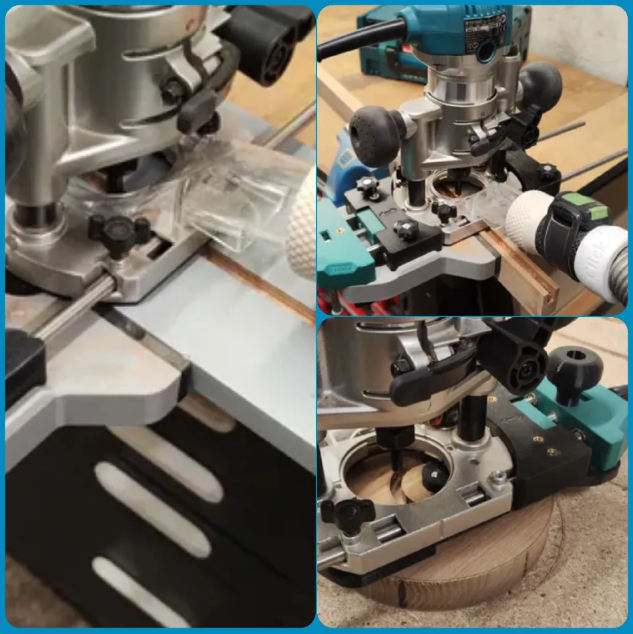
The Makita RT0700 Router Parallel Guide, Circle Cutting and Dowel Cutting Jig combines three useful functions in one printable accessory. It can act as a parallel guide, help with circle cutting, and assist with dowel-related work. Fine adjustment makes it easier to position the router accurately instead of relying entirely on manual measurements. The design is also compatible with the DeWalt D26204K-QS, increasing its usefulness for woodworkers who own either router platform. An optional 32 mm hole-system add-on further extends its use in a workshop. For someone who already owns a compatible trim router, printing this type of guide can provide several specialized functions without buying multiple accessories.
Why print it?
- 3 functions in one jig
- Parallel routing
- Circle cutting
- Dowel cutting
- Fine adjustment
- Compatible with multiple routers
Platform: Printables
Model: Makita RT0700 Router Parallel Guide
4. Pocket Hole Jig
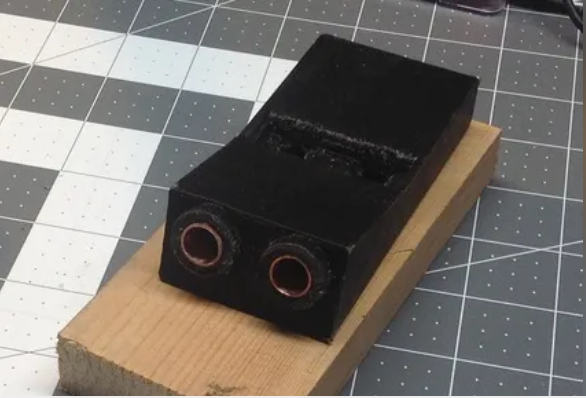
Ocular Dynamic's Pocket Hole Jig is an affordable and functional alternative to buying expensive commercial pocket-hole equipment for woodworkers who wish to make sturdy hidden seams. To avoid dirtying the outside surface while screwing boards together, pocket-hole jigs tilt the drill at a regulated angle. For that reason, you can use this kind of tool for building furniture, shelves, frames, cabinets, and other do-it-yourself wood projects. For infrequent users, the option to create a 3D-printed jig instead of purchasing a pricey kit for pocket-hole joinery is a major selling point. So, if you have a home workshop and value adaptability and affordability, MakerWorld's model is a great buy.
Why print it?
- Hidden screw joints
- Consistent drilling angle
- Useful for furniture
- Good for cabinetmaking
- Avoids buying a dedicated kit
Platform: MakerWorld
Model: Pocket Hole Jig
5. 90° Cabinet Assembly Jig with Drill Guide
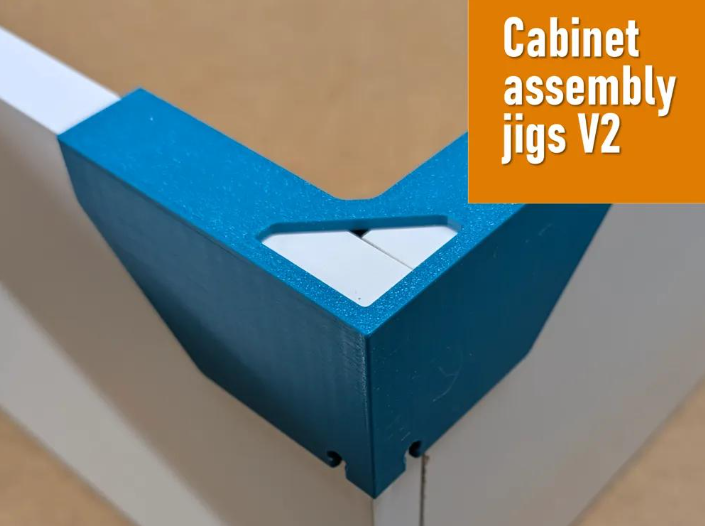
The 90° Cabinet Assembly Jig with 3 mm Drill Guide is designed to help position two furniture panels accurately while assembling cabinets. It is designed around 18 mm furniture boards and combines alignment with a drilling reference. This can be particularly useful when building cabinets from repeated panels because holding two boards square while simultaneously drilling is difficult by hand. The printed jig acts as a temporary third hand, keeping the panels positioned while you work. For DIY furniture makers and small workshops, that can eliminate the need for another specialized assembly accessory. It is a simple example of how 3D printing can turn a common workshop problem into a custom tool.
Why print it?
- Maintains 90° alignment
- Designed for 18 mm boards
- Includes 3 mm drill guide
- Helps cabinet assembly
- Works like a temporary third hand
Platform: Cults3D
Model: 90° Cabinet Assembly Jig
6. Router Circle Jig
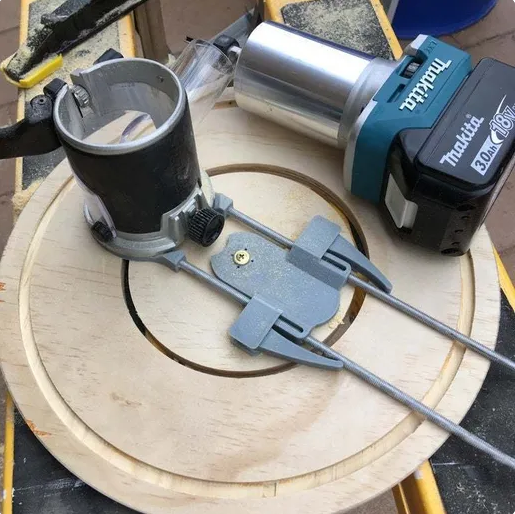
The Router Circle Jig from Cults3D is designed for cutting accurate circles with a router and offers a particularly useful advantage: its radius can extend from approximately 30 mm to virtually unlimited size depending on the setup. The design consists of a router baseplate, clamp, and pivot components and requires minimal additional hardware. This makes it useful for round tabletops, speaker openings, circular signs, cutting boards, and decorative woodworking. Instead of purchasing different commercial circle-cutting accessories for different sizes, a printable guide can be adjusted to the project. For woodworkers who occasionally need large circles, this can be especially valuable because commercial specialty jigs can become restrictive or expensive.
Why print it?
- Adjustable circle sizes
- Large-radius capability
- Minimal hardware
- Useful for router projects
- Good for tabletops and signs
Platform: Cults3D
Model: Router Circle Jig
7. Rip Fence Feather Board
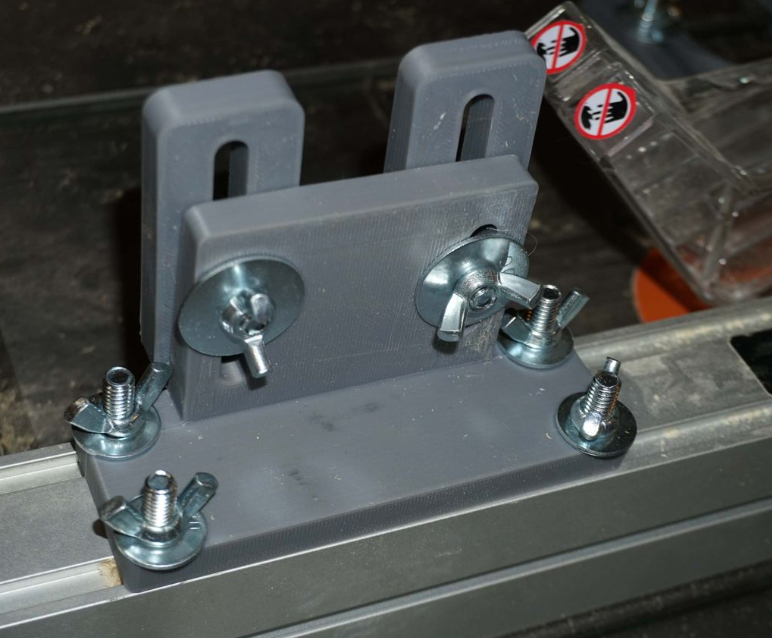
For a more uniform press of stock against the fence while cutting with a Ridgid table saw, try using the Rip Fence Feather Board. Cutting with straighter, more controlled lines and less unwelcome movement is possible with such constant pressure. Using a featherboard can make repetitive cutting easier and more predictable for woodworkers. If you'd rather not risk purchasing a generic featherboard that might not fit well with your saw setup and instead desire a specialized accessory, the printable version is the way to go. The design's focus on the Ridgid table-saw setting highlights a major benefit of 3D printing: the ability to create attachments tailored to a particular workshop instrument.
Why print it?
- Keeps stock against fence
- Improves cut consistency
- Useful for repetitive cuts
- Designed for Ridgid table saws
- Custom fit advantage
Platform: Thingiverse
Model: Rip Fence Feather Board for Ridgid Tablesaw
8. 4-Way Precision Clamp & Drill Guide
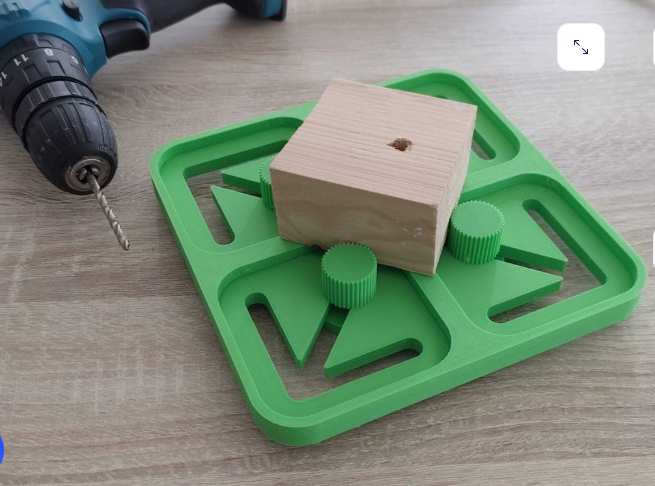
The 4-Way Precision Clamp & Drill Guide combines clamping and drilling assistance in a single compact accessory. That combination is useful when a woodworking project requires a workpiece to stay firmly positioned while you create accurately aligned holes. Instead of holding a board manually and trying to keep the drill straight at the same time, the jig provides a physical reference. This can be useful for furniture assembly, small cabinet projects, repeated drilling, and general workshop fabrication. It is also a good example of where 3D printing has an advantage over generic hardware: the jig can be produced specifically for a particular workflow and modified if your project requires a different size or configuration.
Why print it?
- Combines clamp and drill guide
- Improves hole alignment
- Holds workpieces steady
- Useful for repeat drilling
- Compact workshop tool
Platform: Thingiverse
Model: 4-Way Precision Clamp & Drill Guide
9. Dewalt DWP611 Trim Router Slab Flattening Jig
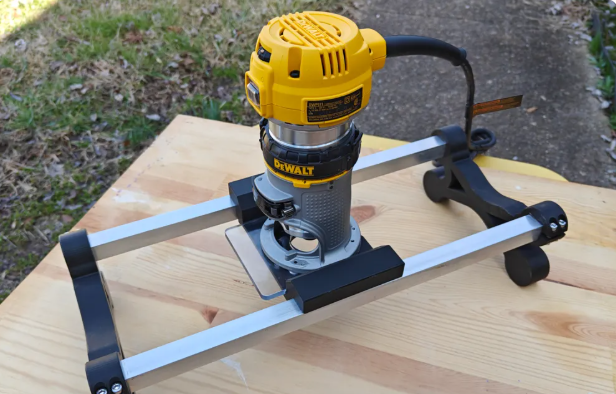
The Dewalt DWP611 Trim Router Slab Flattening Jig is aimed at woodworkers who use a compact router to flatten slabs or large wooden surfaces. Slab flattening normally requires a stable router-sled setup, and commercial solutions can become expensive because they often involve large plates, rails, and dedicated hardware. A printable jig can provide the critical mounting and positioning components while allowing the woodworker to build the rest of the setup around the dimensions of the project. It is particularly useful for live-edge furniture, cutting boards, panels, and other wide workpieces that need a flat surface. MakerWorld also lists a related M18 version, making this concept useful across multiple cordless trim-router platforms.
Why print it?
- Designed for slab flattening
- Uses a compact trim router
- Useful for live-edge projects
- Adaptable to project size
- Can reduce sled costs
Platform: MakerWorld
Model: DeWalt DWP611 Trim Router Slab Flattening Jig
10. Adjustable Angle Finder & Saw Guide

Woodworkers may create more consistent angled cuts with the help of the Adjustable Angle Finder and Saw Guide Rail Set. You can use it for more than just typical 45° cuts because you can alter the angle from about 5° to 90° in 5° increments. An adjustable spacer gauge aids in establishing the proper distance between the guide and the blade or router bit, and the maker also included right-and left-handed versions with a clamping option. For this reason, the attachment is a great tool for woodworkers who often need to do angled cuts, trim, joinery, or router operations. An adjustable printed system can replace the need to buy multiple sets of angle guides for various tasks.
Why print it?
- 5°–90° adjustment
- 5° increments
- Saw and router compatible
- Left/right versions
- Includes spacer gauge
- Useful for repeated angled cuts
Platform: Printables
Model: Adjustable Angle Finder and Saw Guide
Best 3D Modeling Software for Education
SelfCAD is a useful option when an off-the-shelf 3D model does not fit your woodworking setup. You can design custom router jigs, drill guides, clamps, featherboards, templates, and saw guides around your exact tool and material dimensions. Its Fillet and Chamfer tools can smooth edges, while Boolean operations such as Difference and Union help create holes, slots, and interlocking parts. You can also use Scale, Bend, Resolution, and Simplify when refining models for printing. Once the design is ready, SelfCAD's built-in STL slicer can prepare it for 3D printing, making it a practical workflow from custom woodworking idea to printable accessory.
Which Ones Are Worth Printing?
Make sure you're getting the most bang for your buck when shopping for 3D-printed woodworking supplies. The main perk isn't just the money you'll save. With 3D printing, you may create the jig according to the precise measurements of your project, board thickness, track system, router, or saw. These woodworking prints are invaluable to dedicated craftspeople because of the personalization options they provide.